DTimer
A simple countdown timer for Linux
A command-line countdown timer for Linux.
Set a duration, get to work, and let DTimer keep you on track.
Set a duration, get to work, and let DTimer keep you on track.
A simple countdown timer for Linux
DTimer is a lightweight countdown timer built with GTK# and C#. Launch it from the command line or a script, set a duration, and a small GTK window appears showing the remaining time and a progress bar. When the timer ends, an optional sound file plays. That's it — no background services, no config files, no telemetry.
DTimer is intentionally simple. It doesn't aim to be a full-featured productivity app — just a quick, scriptable timer you can fire off without leaving the terminal.
The main branch is theoretically stable. The dev branch contains the latest updates but may break — expect rapid iteration.
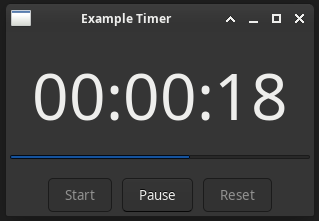
The GTK window is minimal by design:
--name
Large countdown label showing remaining time
Progress bar showing percentage of time elapsed
Start, Pause, and Reset buttons
DTimer requires Mono and GTK#. Install them for your distro before building:
pacman -S mono gtk-sharp-3sudo apt install mono-devel gtk-sharp3git clone https://github.com/metalxxhead/dtimer.gitcd dtimer/chmod +x ./scripts/build.sh ./scripts/run.sh./scripts/build.sh./scripts/run.sh --name "Focus Block" --duration "00:25:00"The compiled binary can also be moved out of build/ and called directly with Mono:
mono /path/to/dtimer.exe --name "Focus Block" --duration "00:25:00"| Flag | Description | |
|---|---|---|
| --name | Name displayed in the window title bar | required |
| --duration | Countdown duration in HH:MM:SS format |
required |
| --start | Start the timer immediately on launch | optional |
| --sound-file | Path to a .wav file to play when the timer expires |
optional |
| --version | Display version information and exit | optional |
| --help | Display help information and exit | optional |
./scripts/run.sh --name "Deep Work" --duration "01:00:00"./scripts/run.sh --name "Pomodoro" --duration "00:25:00" --start --sound-file /home/user/sounds/bell.wav#!/bin/bash
/your/path/dtimer/scripts/run.sh --name "Timer Example" --duration "01:30:00" --start--start.wav format)
DTimer — A simple Linux timer launched from the command line
Copyright © 2026 github.com/metalxxhead
Licensed under the GNU Affero General Public License v3.0. You are free to use, modify, and redistribute this software under the terms of that license. This program is distributed without any warranty. See the license for details.